1.You can create your own t-shirts, I-phone cases, pillows and more without having to order and store any inventory. Learn more about the process here.
When I was on bedrest about 9 years ago, I started creating handmade earrings.
Before I started selling online on my own my WordPress site, I started an Etsy shop. It’s easy to set up as long as you have great pictures, product descriptions, and prices. Check out my Etsy store.
3. Resell Clothes on PoshMark
I’m not much of a shopper, but I love going to the thrift store to see what I can find for myself and my Posh store. Posh mark is a great place to resell clothes that you’ve outgrown or resell thrift store finds. Check out my posh closet here.
4. Resell on E-bay
E-bay is also a great place to sell not only Check but any items that you need to purge from your home. We sell everything from action figures, to printer ink to shoes and clothes.
5. Sell digital products on your website/blog
Perhaps you’re really knowledgeable about a skill or topic. You could create an ebook about that particular topic and sell it on your site.
If you are a technical person, you could help others who need assistance with small gigs and projects. Data entry, graphic design, or writing copy for other small businesses and entrepreneurs. I’ve used Fiverr to outsource some of my logo design and graphic design projects. I’ve used Fiverr to outsource some of my logo design and graphic design projects.
Thinkific is a great platform to use to create free and paid courses. I recently created a WordPress 101-course using Thinkific. I also wrote a blog post about my experience with the platform.
8. Become a coach or consultant
Maybe you have the gift of helping others business or life in general. You could become a coach or consultant and sell your services to other small business owners.
9. Become an affiliate for your favorite brands
Affiliate marketing is a great source of income. You receive a small commission for sharing your favorite brands with others. For example if you have a favorite host that you use to host your website, you can sign up for their affiliate program and receive a commission if someone uses your link to purchase.
There are many other ways to make money online. I have experience with all 9 of the suggested revenue streams. If you need any help or more information about any of them, please feel free to reach out.
What are some ways you can make extra money online?
Before embarking on a journey into the land of WordPress, I was a full time hair stylist. Most times I needed the same information from my clients. After a year or more of printing sheets and filing them or having to sort through them to update client info, I decided to create digital client intake forms and questionnaires.
Sounds complicated huh? Well, it isn’t as hard as it seems. About 2 years ago I started using Gravity Forms to collect pertinent client information and usernames and passwords from my clients. If you’ve ever submitted a quote or worksheet through this site, you’ve used a few of the forms.
Forms can be used for any industry. Hairstylist or anyone in the service industry can use them to create client information sheets. Coaches and consultants can create custom worksheets or workbooks.
Here are a few examples of forms that I’ve created using Gravity Forms:
You’ve chosen a managed WordPress hosting provider that doesn’t have email included. If you want to keep email separate from web hosting, you’ll need an email host.
Solution:
You need a reliable e-mail host and luckily for you, there are several options. Before I discuss any options, let me make sure you understand the basics of email hosting. Email hosting is a service that runs email servers. Most web hosting companies provide you with emails. The email service provided by web hosting companies supplies you with basic email and basic spam/virus protection.
If you own a small business, then you should consider using email using a professional email hosting service. Using a professional email host will give you a chance to focus on your business. The email host provider manages your email services. Most providers offer many webmail features including the following:
unlimited aliases
unlimited forwarders
autoresponders
large attachments
robust spam/virus protection
mail rules
IMAP/POP3
online storage
calendars
backups
archiving
folder management
contacts management
You would also be able to access your email from anywhere using webmail, smartphone, and your favorite email client such as Outlook. Best of all, professional email host packages are very inexpensive. You could get monthly services for as little as $3.00 per user per month. While there are many options to choose from, there are 2 solutions I offer to my clients. G-Suite or Zoho. I personally use G-Suite. So even if I decide to switch web hosts, my email service won’t be interrupted.
In the next post, I will give you a detailed overview of each. In the meantime, I want you to check your email needs. Do you currently host your email with an email host? If so, who do you use? Comment below and be on the lookout for my next post.
Need some help with deciding, contact me to chat more.
For the past year or more I’ve gone back and forth in my mind about offering online courses. Sounds like a simple thing to do, but in my mind, it was the most challenging thing ever. There’s a lot of information swirling around in this head, and trying to get it all out in a clear and concise manner seemed overwhelming. Well, I’m happy to report that I finally created a course. I just launched the WordPress 101 course using Thinkific.
Thinkific made it super easy to add my content. I started out with an outline, added any worksheets or pdfs that I wanted to include, and it was super easy to add videos for each section. Thinkific also provided templates and helpful guides for each section. If you are on the fence about creating a course, don’t overthink it. Grab a pen and paper, outline your content, create it, and upload it to Thinkific.
The WordPress 101courses teaches you how to not only get setup with WordPress but also teaches you how to easily navigate through the backend of WordPress.
Here’s a screenshot from the WordPress 101 Course:
There are many other platforms that you could use to launch a course. I love Thinkific because of its ease of use and simple design.
If you need some assistance with coming up with possible courses that you could teach, feel free to email me at oliviam@onemooresolutions.com
Wanna get signed up with Thinkific for free? Click on my affiliate link image below to get started!
Recently, my role at my job has changed. I was asked to take over some of the social media accounts for 3 different charities. It’s a task I could handle, but because I don’t work weekends, I need a solution to automate as much of the social media marketing as I could. My first focus is Instagram because each charity has great images. I also have a word document containing hashtag and topic ideas. I needed an Instagram Marketing Automation tool ASAP! SO after taking a day or two to create a game plan, I had to decide which tool I could use to help me manage this content and schedule and automate posts. Today I’m going to share 2 tools I found that could be used to automate your Instagram posts.
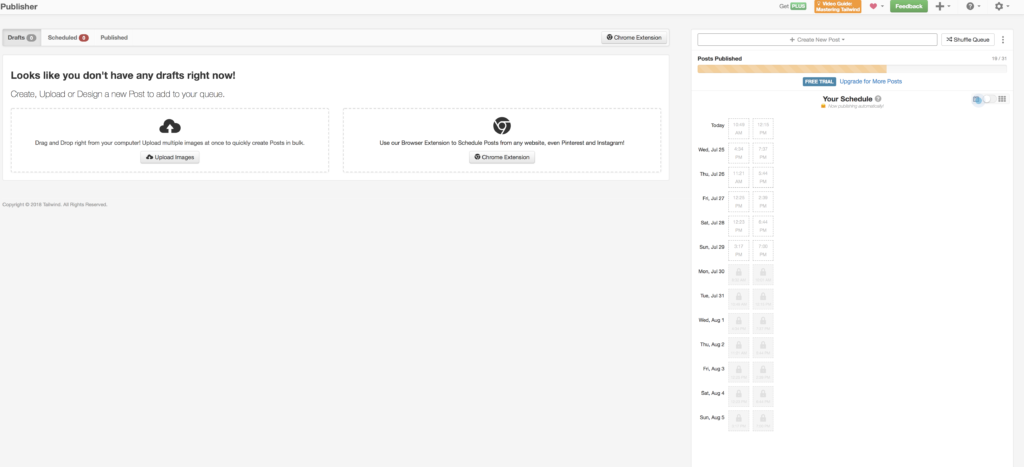
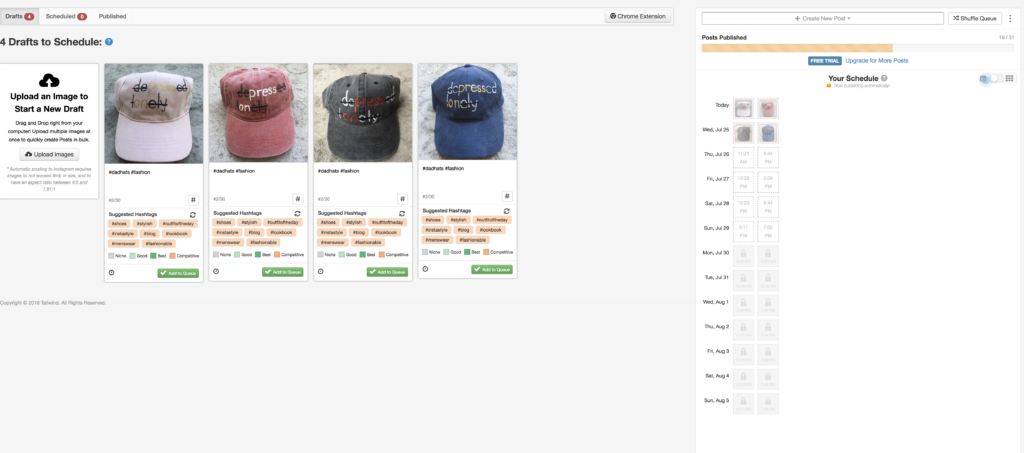
The first tool is Tailwind. I use Tailwind to create posts for each Instagram account ( 2 different accounts) as well as 3 Pinterest accounts.
I use the publisher to upload multiple images. I also use the chrome extension when I need to bulk upload blog posts from each site. It saves me time! I no longer have to download the image from each post and log in. It also has suggested time slots and a super cool calendar view.
I’m very visual, so I love that Planoly has a calendar view and that I can see my previous posts and stats and easily reschedule them or quickly view my plan for the week or month.
I hope that you get a chance to utilize one of these tools for your business. The important thing to remember is that none of these tools can do the planning for you. It’s on you to make sure that you have great content and a game plan.
If you have any questions or you need any assistance with getting set up, do . not hesitate to reach out.