The shutdown is still in full effect. Last week I shared a post on how to make money during shutdown with PoshMark. Today I want to share a quick and simple solution that has helped me earn extra money every month.
A few months ago, a good friend referred me to Capterra. It’s a site where I can earn extra money writing quick reviews on software that I use every day. I can’t lie, I was a little skeptical at first, but I figured it was worth a try. BTW, this links in this post are my referral links.
Choose software that you currently use or you’ve before.
Complete the review and submit. For every software review, you write, you could earn money for each review.
Once Capterra reviews your review and approves it, they will send you a payout for every review via gift card. Your choices are Visa, Amazon, Starbucks, or Apple Itunes. You could also donate your earnings. You are allowed to write up to 10 reviews per month.
That’s it 🙂
So far I’ve written reviews for Quickbooks, Trello, LastPass, and few others. Writing a review is easy if you’ve used the software often. I’ve used my earnings to make purchases while on bedrest. I purchase my bedrest necessities from Amazon, to order and I use it to order food via GrubHub or Ubereats via the Visa gift card option. Last month I made an extra $100 dollars. It’s not enough to pay the rent, but really came in handy when I needed it.
I hope this helps bring extra money to your household this month. Every penny counts. Feel free to reach out if you have any questions or need some help coming up with strategies to bring in extra income.
Watching the news and social media feeds can be a little frustrating and depressing. I can’t imagine how it feels to not get paid for going on 24 days now. Instead of focusing on all of the problems this shutdown has created for families, I want to focus on some possible solutions that could help bring in some source of income during these tough times. I wrote a blog post about 9 ways to make money online, but this post and the next few posts will go into greater detail on how to get started with a few of these sources.
Today I am going to discuss Poshmark.Poshmark is a place where you can sell fashion online. Last year I set up my posh closet using old items from my closet that no longer fit or that was just there collecting dust. I also picked up a few pieces from the local thrift store for under $2.00, researched the resell value and used that as a baseline price for my posh closet.
Here are the steps to get started on Poshmark:
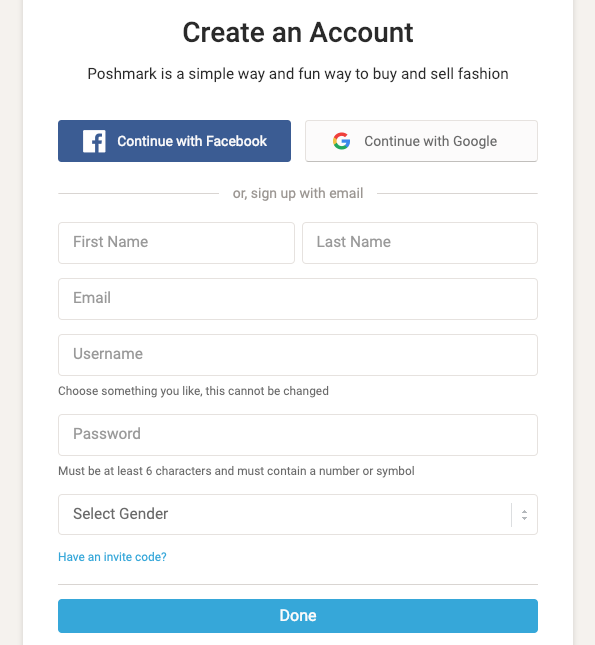
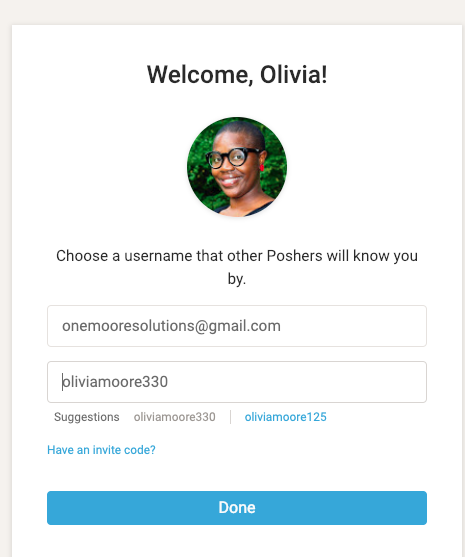
Create an account on PoshMark. You can use my invite code (OLIVIABTHOMPSON) when you sign up to receive $5 in your account. Make sure you choose a good username and profile pic. (Smile : ))
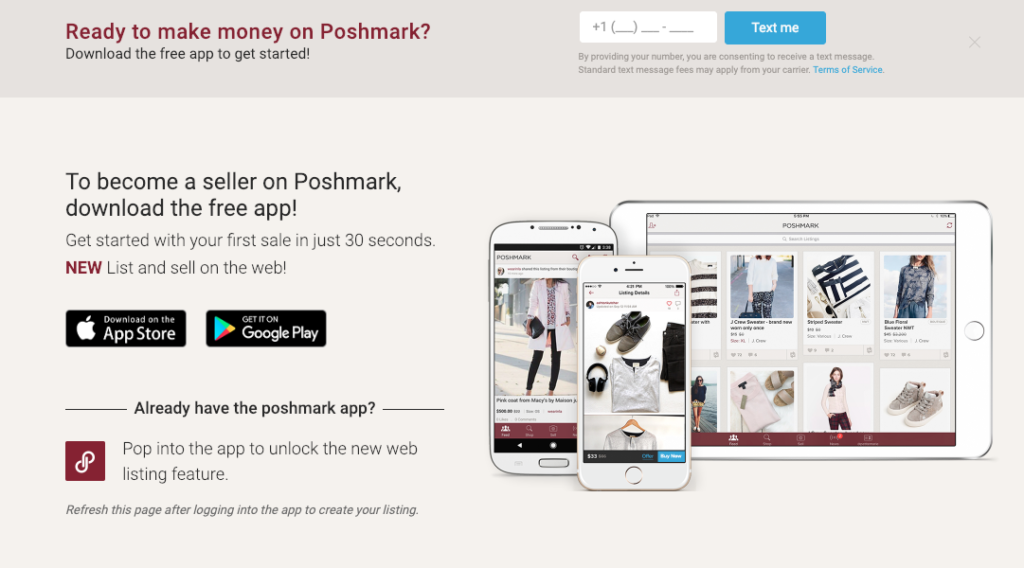
Once you are signed up, click on the sell on Poshmark link on the top right corner. You will be instructed to download the mobile app, which is a great way to run your Poshmark store on the go.
Once you are all set up, it’s time to add your listings. In order to add listings, you must have good pictures of your item that you are selling from different angles. Take a look at some examples from my closet. These pictures were taken using an iPhone and the sidewalk in the front of my home.
4. Next add your title, description, and price. If we use the shoes above as an example, I would set my price between $15.00 or $16.00. The original price for these was $25 and they are gently used. The buyer would be charged 6.95 for priority shipping so the total listing price includes the cost of shipping.
5. Double check your details and publish your listing. You can share your listing on the social media sites that you’ve connected. Repeat this process for any additional listings.
Poshmark has been a great stream of income that really helps during the in-between paycheck times, or when I needed some extra income, and needed to eliminate some unused items from my closet. You can take a look at my Poshmark Closet here: https://poshmark.com/closet/oliviabthompson
This is just one way to make extra money during the shutdown. For more assistance with getting started with Poshmark, or to get help with finding solutions, feel free to contact me or schedule a session.
So you’ve decided to finally take the time to get a website for your business. I’ve put together a list of things that you can do now to be fully prepared when it’s time to start building your site or before you hire someone to build it for you. ( BTW, Some of the links below are affiliate links.)
1. Secure your domain – What exactly is a domain? In layman’s terms, a domain is a unique name that identifies a website. Each website has a domain. So if your business is called Simple Truth, a good domain name would be simpletruth.com or simpletruth.net
2. Find a reliable web host- In order to get your website online, you need a good, reliable web host. If you’re going to go the WordPress route, I would recommend Bluehost or a managed WordPress host. I personally recommend Flywheel for your managed WordPress provider. Check out this blog post I wrote about web host: What is a Web Host?
3. Choose the right platform for your business- There are many different platforms to choose from. It all depends on your business needs and how much monthly maintenance you want to do. Some options you have are Squarespace, Wix, and WordPress. Most of my clients prefer WordPress because of its flexibility and its ability to grow with your business.
4. Write down your needs – Decide the who, what, and how of your business. Are you a hairstylist who needs a site to display your work and book appointments? Or maybe you are a consultant who needs a one-page site that has a blog and a simple contact form and links to your social media pages.
5. Get a professional headshot- You’re going to need a great image of you for your site and a low-quality pic won’t do. Schedule an appointment with a local photographer and get one or two headshots done.
6. Write a bio- Who are you? and what do you offer? Whether you decide to create a full 5-page site or a one-page site, you will need a bio.
7. High-quality images for your site- Good photos can make or break your site. You don’t have to break the bank. You can use stock photos. one of my favorite sites to get photos is unsplash.com
8. Copy for each page/section of your site- Great pics are nice and you may have found the perfect layout/template. None of that matters if you don’t have web copy. What is copy? Website copy is the text that guides people through your website and tells them what they need to know. It’s what’s on your home page, your about page, your products and services pages,
9. Business E-mail address– There’s nothing wrong with having a Gmail address, but having a business email is important. You can get a business email through your web host or you can get one through an email host. I use G-Suite for my business, and a few of my clients use Zoho mail. If you would like to try G-suite and receive a 20% discount per user for a year. you can use this link: G-Suite Trial .
10. E-mail marketing provider – I wish I had known the power of email marketing when I first started. Even if you don’t have clients or customers yet, I would recommend that you start building your email list. My recommendation would be Mailchimp.
There’s no way to be 100% prepared, but these 10 tips will get you off to a great start. If oyu have any questions or comments, do not hesitate to contact me .
WordPress 5.0, featuring the new Gutenberg editor, has officially been released! And if you’re like any of my clients, you may not be ready for the big change. No worries! If you’re not quite ready to embrace the change, I want to show you how to install the classic editor and switch to the Gutenberg editor when you are ready.
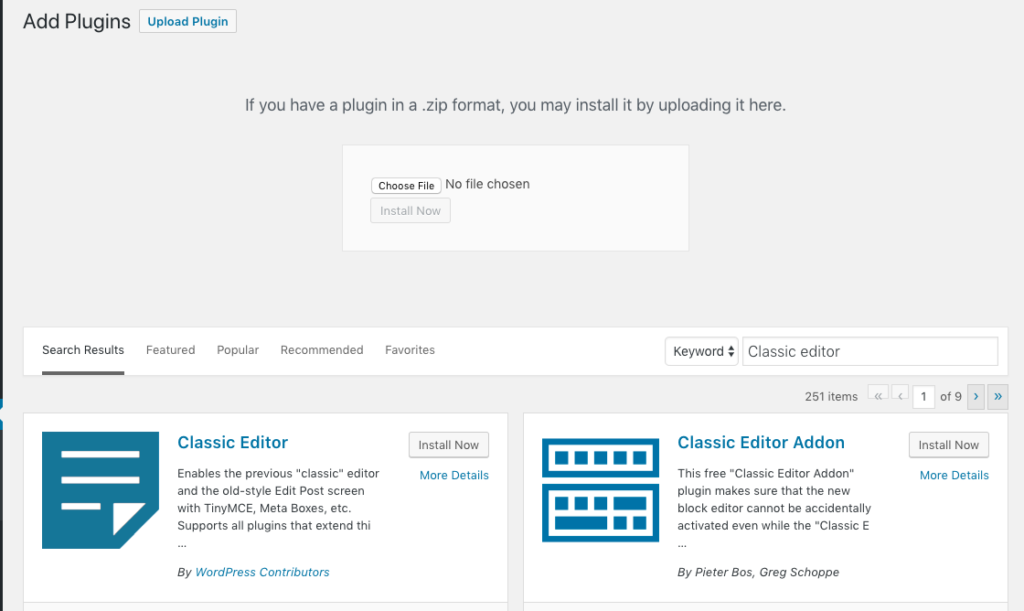
Step 1: First, you want to head over to the Plug-in section and search for Classic Editor. You can also download the link from the WordPress Repository site here: Classic Editor Plugin.
Step 2. Next, you want to click the Install Now button.
Step 3. Once the plug-in is installed, click on Activate.
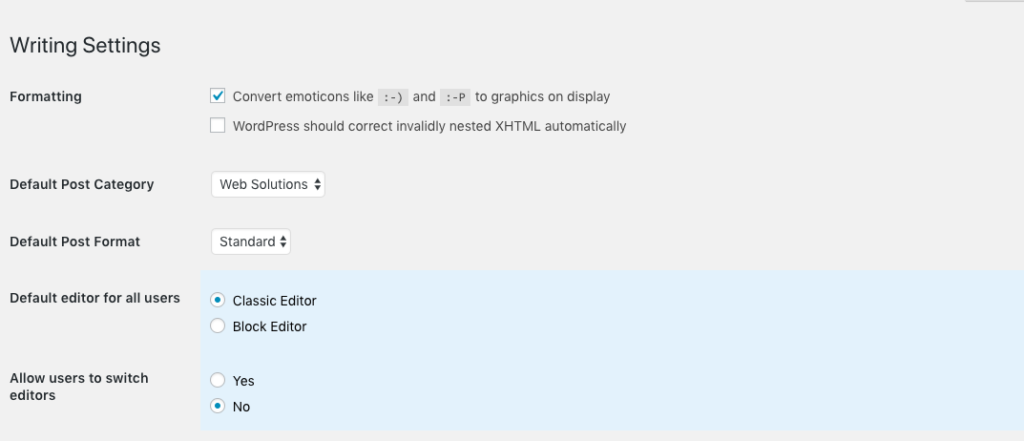
Step 4. Head over to the Classic editor plug-in settings and click on use classic editor as the default editor for all users.
That’s it! You should now be able to post using the classic editor. Hope this makes sense. Feel free to contact me if you need a little help.
Hello, my name is Olivia and I am a creative solutions expert. If there is a problem, I do not stop until I find the right solution. I haven’t written in a while, but as you all know, life can sometimes happen and cause you to get lost in your own thoughts and mental stuff.
That’s a big part of the reason why I am taking the time to write this post today. As of today, I am 21 weeks pregnant and on bedrest until April 17th. Sounds kinda scary right? Well it can be quite overwhelming if I try to think of how to get through 19 more weeks in one night. It’s kinda the same way I approach business at times.
Based off of the phone calls and strategy sessions that I have with a few of you, I ‘m learning that most times you all have the answers, but often get overwhelmed or distracted by a mind full of what-ifs or trying to find the way that is guaranteed to work. Then before you know it, weeks have gone by, and the problem still exists.
Let me help you. Whenever you feel overwhelmed with a problem, take out a pen and pad and write the problem at the top of the paper. Draw a line under the problem and write a list of all the possible solutions. Don’t try to figure out anything. Just get it all out. Once you’ve got it all out, eliminate the options that you know won’t work. Trust yourself! Be patient with yourself. Eventually, you will get the right solution, or find the courage to try each one until you find the right one. And if all else fails, reach out to me or set up a strategy session with me.
I am here to help and I love to find solutions.
Remember, there is a solution to every problem, we just need to find it.