
by Olivia Moore | Oct 2, 2025 | Web Solutions
Let me be real: most people don’t like tech. And I don’t blame them.
It feels cold. Complicated. Like something you’re “supposed” to know but can never quite catch up to. And when something breaks? Instant panic. I’ve been on the other side of those late-night texts from people saying, “My site is down, I don’t know what happened.” The stress is real.
That’s why I started One Moore Solutions… not just to fix websites or train people on tools, but to be the translator. The bridge between all the intimidating, techy stuff and the people who just want their work to flow.
Because here’s the truth: technology isn’t the enemy. The way it’s presented is. Tech should feel like support, not sabotage. It should give you peace of mind, not knots in your stomach.
When I use AI to make music, I feel more me, not less. When I create prompts that help small business owners write better content, I see relief on their faces. When I put a client’s website under care and they stop worrying about “what if it breaks?”… that’s tech at its most human.
The goal has never been to replace us. The goal is to free us. To give us back our time, our energy, our creativity, our peace.
And that’s why I’ll keep saying this: Tech should feel human. It should feel like an extension of your hands, not a lock around them.
Lesson: The best tech makes you feel more present in your life, not less.
If your tech feels overwhelming, let’s change that. Book a Call.
by Olivia Moore | Oct 2, 2025 | Web Solutions
Every entrepreneur knows this struggle: explaining the same thing over and over. Whether it’s how to post on Instagram, how to send invoices, or how to handle customer emails …you find yourself repeating directions instead of moving forward.
That was me, too.
I hated writing SOPs (standard operating procedures). It felt overwhelming to sit down and type out every little detail, format it, and try to make it clear enough for someone else to follow. But without them? Chaos. Nothing was consistent, and mistakes kept happening.
So I turned to AI.
Now, instead of starting from scratch, I dump my messy notes or even a voice memo into AI. With the right prompts, it spits out a clear, step-by-step process document. Then I tweak it, make sure it matches my style, and it’s done.
What used to take me hours now takes 15–20 minutes.
The beauty of this is that it’s not just about saving time. It’s about freeing mental space. I don’t have to carry all the “how-tos” in my head anymore. I can focus on strategy and creativity instead of babysitting the basics.
Lesson: AI isn’t just about flashy outputs. Sometimes the most powerful thing it does is take the weight of everyday repetition off your plate.
Imagine what you could do with the hours you spend repeating yourself. Book an AI Audit and let’s map it out.
by Olivia Moore | Oct 2, 2025 | Web Solutions
Websites are like cars. If you keep driving and never change the oil, never rotate the tires, never get a tune-up… it’s only a matter of time before something breaks down.
I’ve worked with too many small businesses who wait until their site crashes to finally call for help. The truth is, it doesn’t have to get that bad. Here are three warning signs I see over and over again that mean your site needs attention:
1. It’s getting slow.
If your site takes more than 3 seconds to load, most visitors will bounce. It doesn’t matter how good your service or product is if people can’t even see it. A slow site usually means outdated plugins, bloated themes, or missed updates.
2. You’re scared to click “Update.”
I can’t tell you how many people admit this to me: “Every time I click update, something breaks.” That’s because WordPress is constantly changing …core, plugins, themes. If you’re not managing these updates in a safe way (with backups in place), you’re gambling with your site.
3. You don’t know if it’s backed up.
Here’s the scary one. If your site went down tomorrow … got hacked, crashed, or corrupted … could you restore it? If you don’t have a recent backup, the answer is no. That means starting from scratch.
Your website is the digital front door to your business. You wouldn’t leave your physical store unlocked with broken lights and no security system. So why do that with your site?
Lesson: WordPress care isn’t just tech maintenance. It’s peace of mind.
That’s exactly what my WordPress Care Plans are for: Explore Care Plans.
by Olivia Moore | Oct 2, 2025 | Web Solutions
When people hear “AI music,” a lot of them get defensive. They picture soulless robots making songs with no heart, no story, no real connection. I get it. I used to feel the same way. Music has always been my safe space, my best friend, my diary. The idea of a machine replacing that? No thank you.
But when I actually started experimenting with AI music tools, I realized that wasn’t what was happening at all. AI wasn’t stealing my creativity … it was helping me unlock it.
For years, I’d have lyrics and melodies pop into my head at the most random times. In the car, in the shower, while cooking. I’d hum them into my phone or scribble words down, but they would often stay stuck there. To take an idea and turn it into a full track meant studio time, hiring musicians, spending money I didn’t always have, and learning technical skills that didn’t excite me.
AI changed that.
With tools like Suno, I could feed in my ideas…my words, my vibe, my direction … and get back something tangible. I could hear what a song might sound like, experiment with beats, and shape melodies in real time. It didn’t “write songs for me.” It gave me a head start. It gave me a way to play.
And here’s the wildest part: I’ve been able to release original songs on platforms. Me. Without waiting for permission, without blowing my budget, without second-guessing if I was “ready.”
For me, AI hasn’t been about shortcuts. It’s been about freedom. The freedom to finally hear my voice …not in the unfinished scraps on my phone, but in a polished form I can share with the world.
I’m not saying AI replaces the soul of music. It can’t. But what it can do is make sure the soul inside of you actually gets expressed.
Lesson: AI doesn’t erase artistry. It accelerates it. It lets creators get unstuck.
Want to explore how AI could help you create faster without losing your voice? Book an AI Audit.
by Olivia Moore | Sep 14, 2023 | Web Solutions
Client Background
Client Name: Nykisha Brooks
Business Name: Uniquely You Natural Hair Care
Industry: Natural Hair Care
Location: Sunderland, Maryland
Introduction
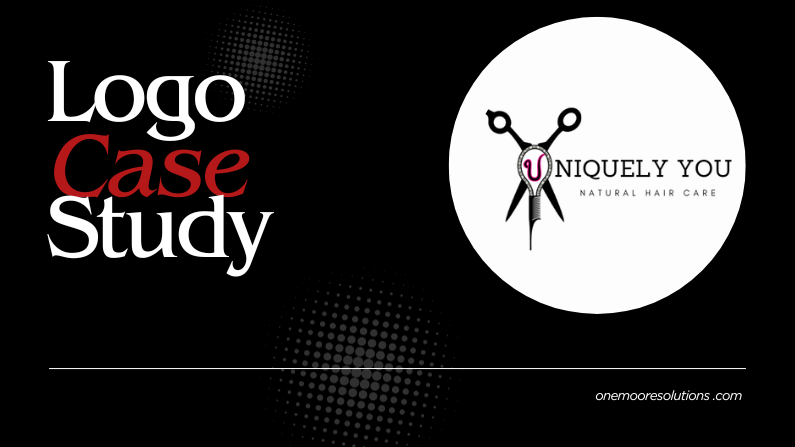
Nykisha Brooks, the owner of Uniquely You Natural Hair Care, is a dedicated natural hair stylist known for her personalized approach to hair care. With a strong commitment to promoting healthy natural hair and boosting her clients’ self-esteem, Nykisha’s salon has gained popularity and a loyal customer base. However, she recognized that she was tired of her current logo needed a makeover to give her brand a boost.
Challenges
Outdated Visual Identity: The existing logo had been in use for several years and felt outdated. Its intricate details and complex design no longer resonated with a more modern aesthetic.

Objectives
Develop a new logo that embodies modern simplicity while reflecting the salon’s mission and values.
Create a versatile logo that could be used across various platforms and materials.
Process
1. Discovery and Visioning: Nykisha and I chatted via Instagram DM and discussed her new vision and any changes she wanted to make to her logo.
2. Based on the info gathered, I generated multiple updated logo concepts. These concepts focused on simplicity, and making sure I kept key elements from the old logo.


3. I explored typography styles, iconography, and color palettes that resonated with the brand’s essence. They also incorporated natural elements like hair strands and leaves to symbolize both hair care and the salon’s dedication to nature.
4. Nykisha was actively involved in the design process, providing feedback on each concept iteration. The collaborative approach ensured that the final logo would truly represent Uniquely You Natural Hair Care.
5. After several rounds of refinements, a final logo emerged. The chosen design featured a simplified illustration of her original concept. The typography was clean and contemporary, exuding a professional yet approachable vibe.
6. Color Palette: We decided to keep her original brand colors.
Results
The collaborative efforts between Nykisha and me resulted in a rejuvenated logo that resonated with Uniquely You Natural Hair Care’s audience. The modernized logo effectively conveyed the salon’s commitment to natural hair care, individuality, and empowerment. With its versatility, the new logo is seamlessly integrated into various branding materials, from social media profiles to signage and product labels.

Conclusion
By embracing modern simplicity and authenticity, Nykisha successfully revitalized her brand’s visual identity. This case study shows the importance of aligning visual elements with a brand’s core values and mission.
by Olivia Moore | Sep 8, 2023 | Web Solutions
Spam comments on your WordPress website can be super annoying. They clutter your content, harm your website’s credibility, and create extra work for you as you sift through the junk to find legit comments. Fortunately, there are things you can do to combat this issue. In this post, I’ll explore five ways to prevent WordPress spam comments and keep your website clean and user-friendly.
1. Enable CAPTCHA or reCAPTCHA
CAPTCHA (Completely Automated Public Turing test to tell Computers and Humans Apart) and **reCAPTCHA** are super dope tools to thwart automated spam bots. By requiring users to complete a puzzle or click a checkbox to prove they’re human, you can significantly reduce spam submissions.
To enable CAPTCHA or reCAPTCHA on your WordPress site, consider using a plugin like Google Captcha (reCAPTCHA) by BestWebSoft. It’s user-friendly and provides solid protection against spam.
2. Use a Spam Comment Filter Plugin
Spam comment filter plugins are a WordPress site owner’s best friend. Two of the most popular options are Akismet and Antispam Bee. These plugins automatically detect and filter out spam comments, sparing you the headache of having to sort through them to find legitimate comments. Simply install one of these plugins, configure the settings, and let them work their magic. They are highly effective and constantly updated to combat new spamming techniques.
3. Moderate Spam Comments Manually
While automated tools and plugins are great, some spam comments may still sneak through. To ensure nothing harmful or irrelevant gets posted on your site, consider enabling manual comment moderation. This means you or your team will review and approve comments before they appear on your website. While it requires a bit more effort, manual moderation gives you full control over what gets published. It’s an effective way to ensure a spam-free comment section.
4. Limit Hyperlinks in Comments
Spammers often use comments to promote their websites or products by including multiple hyperlinks. You can deter them by limiting the number of links a user can include in a comment. Most genuine comments won’t need more than one or two links. To implement this restriction, use a plugin like “WP Limit Comment Links.” It’s a simple yet effective way to reduce spammy links in your comments.
5. Disable Comments on Older Posts
As your website grows, older posts can become targets for spam comments. Since these posts may not receive as much attention from you or your audience, consider disabling comments on them. You can do this by going to the post’s settings and unchecking the “Allow Comments” box. It’s a preventive measure to keep spam at bay on less active content.
In conclusion, WordPress spam comments can be a nuisance, but with these five strategies and proper regular maintenance, you can significantly reduce their impact on your website. Implementing CAPTCHA, using spam comment filter plugins, manual moderation, limiting hyperlinks, and disabling comments on older posts are all effective ways to maintain a spam-free and user-friendly WordPress site. By taking these steps, you’ll create a better experience for your readers and save yourself valuable time and energy.
